
Automated SSO Login for GitHub
Overview
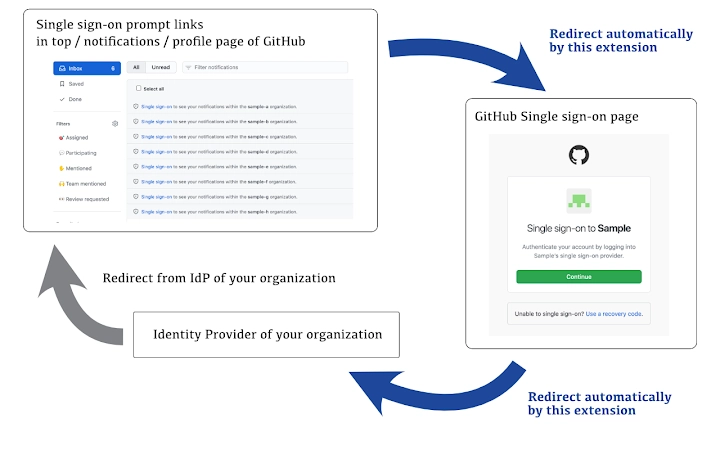
The Automated SSO Login for GitHub extension addresses a common pain point for developers and teams using identity providers (IdPs) with GitHub’s single sign-on (SSO) system. Even when a user’s IdP session remains valid, GitHub frequently requires re-authentication across multiple organizations, especially when navigating the Top, Notifications, or Profile pages. This repetitive process becomes increasingly time-consuming as the number of SSO-enabled organizations grows. The extension eliminates this friction by automatically clicking the SSO login links on GitHub’s interface, reducing manual effort and improving workflow continuity. It is designed for professionals and technical users who manage multiple repositories across various organizations on GitHub. The tool operates entirely within the browser environment and is built as an open-source project, emphasizing transparency and community trust. While no official relationship with GitHub, Inc. is stated, the extension functions as a lightweight utility that enhances productivity without altering core GitHub behavior. Its primary use case lies in streamlining access for developers who frequently switch between organizational accounts and seek a faster, more efficient login experience.
Key Features & Capabilities
- Automatic SSO Link Clicking – Detects and clicks SSO authentication links on GitHub’s Top, Notifications, and Profile pages without user intervention.
- Multi-Organization Support – Works across any number of SSO-enabled GitHub organizations, reducing repetitive manual actions.
- Seamless Browser Integration – Runs as a web extension on supported browsers, requiring no additional setup beyond installation.
- Open-Source Transparency – The codebase is publicly available, allowing users to audit functionality and ensure no hidden behavior.
- Minimal Resource Usage – Designed to operate efficiently with low impact on browser performance and memory.
Users benefit from a consistent login flow, especially during high-activity periods such as code reviews, pull request approvals, or team syncs. For example, when a developer opens GitHub after a break, the extension automatically handles SSO prompts for all organizations they belong to, eliminating the need to click each link manually. This is particularly valuable in enterprise environments where SSO policies are enforced across many teams. The extension does not store credentials or session data—it only triggers actions on the page. Its lightweight nature ensures it doesn’t slow down browsing, making it suitable for daily use across multiple projects.
User Interface, Workflow & Performance
The extension operates entirely in the background with no visible interface or configuration panel. Users interact with it indirectly through GitHub’s standard UI. Upon loading a page with an SSO prompt, the extension detects the relevant authentication button and triggers a click automatically. The workflow is passive: no user input is required once installed. Navigation remains unchanged—users continue using GitHub as usual, with the extension handling behind-the-scenes actions. The developer did not specify resource usage details, but given the extension’s size (1.2 MB) and nature as a lightweight automation tool, it is expected to have minimal impact on CPU or RAM. Performance observations are based on general software behavior patterns. Stability is maintained through reliance on standard DOM manipulation methods, avoiding complex or intrusive scripts. The extension does not interfere with other browser extensions or GitHub’s core functionality. No known crashes or conflicts were reported in the provided data.
Compatibility & System Requirements
The extension is compatible with Windows, Mac, and Linux operating systems. It is designed to work with modern web browsers that support standard extension APIs. The installation size is 1.2 MB, indicating a compact footprint. The developer did not specify exact system requirements, such as minimum RAM, processor speed, or browser versions. Compatibility information was partially provided. Users should ensure their browser supports web extensions and has JavaScript enabled. No additional software or dependencies are required. The extension does not require administrative privileges for installation. It is available as a standalone package for direct installation via browser extension stores or manual loading. The version is 1.0.0, indicating a stable initial release.
Pros and Cons
Pros
- Automatically handles SSO logins across multiple GitHub organizations
- Open-source and transparent, enabling user verification
- Lightweight with minimal impact on browser performance
- Free to use with no hidden costs or subscriptions
- Works seamlessly across Windows, Mac, and Linux
Cons
- No visible interface or configuration options
- Relies on GitHub’s page structure, which may break if UI changes
- Does not support custom SSO workflows beyond basic link clicking
- Requires browser extension support and manual installation in some cases
- May not function if JavaScript is disabled or blocked
FAQ Section
Is this extension compatible with all browsers?
The extension is designed for browsers that support web extensions. Specific browser compatibility details were not provided by the developer.
Is the extension safe to use?
Yes, the extension is open-source and does not collect or store personal data, credentials, or session tokens. It only triggers clicks on existing SSO buttons.
How often does the extension update?
Update frequency is not specified. Users should monitor the official repository for new releases.
Does it work offline?
The extension requires an active internet connection and access to GitHub’s web pages to function.
What license type does it use?
The license type was not specified in the provided information.
Final Thoughts + CTA
Automated SSO Login for GitHub delivers a focused, practical solution for developers overwhelmed by repetitive authentication steps. Its ability to streamline access across multiple organizations without user input makes it a valuable tool in fast-paced development environments. While it lacks advanced configuration options, its simplicity and transparency are strengths. The open-source nature ensures trust, and the free, lightweight design makes it accessible to all users. For anyone managing several GitHub organizations and seeking to reduce login friction, this extension offers a clear advantage. It’s not a full SSO management system, but it excels at its intended purpose. If you’re looking to save time and improve workflow efficiency on GitHub, this tool is a must-have. Download Automated SSO Login for GitHub now.







